
getting started ·
What Goes on Your Board? Picking the Right Daily Tasks
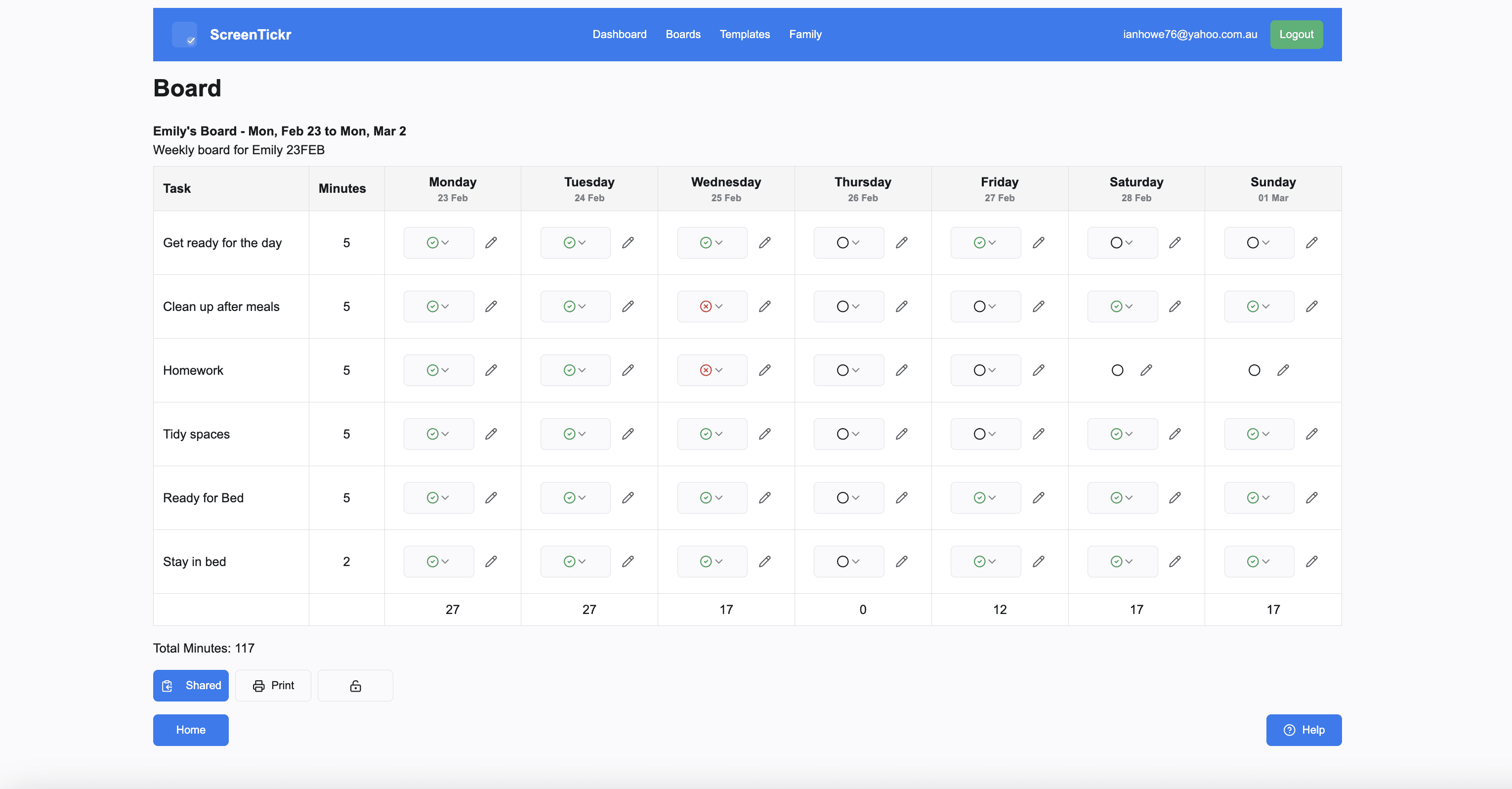
You open a new template and it offers a starter list of tasks to pick from. Suddenly everything your child does in a day feels like a candidate, and you're not sure whether "washing the car" belongs next to "brushing teeth".
It doesn't. Here's how to tell the difference.
The Right Kind of Tasks
Put the things your child needs to do for themselves on the board. Getting dressed, brushing teeth, packing their bag, going to bed on time. These are the parts of the day where the nagging lives, and that's exactly the friction ScreenTickr is built to remove.
Constant reminders teach children to wait for the prompt. Why track the time yourself when someone else is keeping track for you? The board hands that job back to them. If a task doesn't get done there's no drama, only fewer minutes earned at the end of the week. The consequence is real, and it's calm.
ScreenTickr works best when it reinforces everyday responsibility. It isn't a chore chart for paid work, and it isn't a punishment. Set up well, it takes the friction out of the day and builds habits that eventually run on their own.
Why Not Let Them Face the Consequences?
Natural consequences have their place, but they don't always work in practice. One child refusing to get ready in the morning doesn't only affect that child. It derails a sibling, a parent's commute, and everyone else's start to the day. The person who made the choice is often the one who pays for it least.
The board creates a contained consequence instead. The cost lands later, as reduced screen time at the end of the week, rather than as a chaotic morning where the whole house pays.
What to Leave Off
Tasks you'd pay someone else to do don't belong on the board. Deep cleaning, mowing the lawn, washing the car: those are jobs, and jobs belong in a separate pocket money system. ScreenTickr is about personal responsibility, not income.
Leave off anything your child can't do without you, too. If a task needs your help to finish, it isn't theirs yet, and putting it on the board sets them up to lose minutes for something outside their control.
A Starting Point for an Eight-Year-Old
A solid board has four to six items. A typical six:
- Getting ready for school
- Tidying up after meals
- Organising their personal space
- Doing homework
- Bedtime routine
- Staying in bed after lights out
You can add instrument practice, exercises, or a specific habit you're working on. Keep it manageable. A board with fifteen items on it stops being a board and starts being a list nobody reads, and a child who can't see a path to a decent score will stop trying for one.
Finding the Right Balance
Four to six tasks at five minutes each, every day, comes to somewhere between a little over two hours and three and a half hours of screen time across the week. Tasks limited to certain days earn less, so a weekday-only homework task brings that figure down.
Start from the total you're comfortable with rather than from the tasks. If three and a half hours a week sounds like too much, put fewer things on the board or make each one worth less. The number should be an amount you're happy to hand over.
Then set the rules for how that time gets spent. In our house a family movie doesn't come out of the total, but a game on the console does. Console time is off the table on school nights, when screen time is capped at half an hour and steered towards something educational. Weekends are looser. Decide your version up front, so the board handles the earning and your rules handle the spending.
Tip: start with four tasks, not six. You can always add one in week three. Taking one away because the board is overwhelming feels, to a child, like a punishment for something they didn't do.
The goal was never a perfect score every week. It's fewer arguments and a steady build of independence. Eventually the tasks stop being about screen time at all, and become part of how your child moves through the day.